Cisco-switchar och routrar konfigureras på liknande sätt genom Cisco IOS CLI (Command-Line Interface). Många grundläggande kommandon är gemensamma för båda typerna av nätverksenheter, exempelvis kommandon för att ange enhetens namn, konfigurera lösenord, lägga till beskrivningar, spara konfigurationen och kontrollera enhetens status.
Skillnaden blir tydligare när vi börjar konfigurera själva nätverksfunktionerna. På en router konfigureras normalt IP-adresser direkt på de fysiska interfacen. På en Layer 2-switch används de fysiska portarna främst som switchportar, medan en IP-adress för administration normalt konfigureras på ett SVI (Switch Virtual Interface).
Topologi
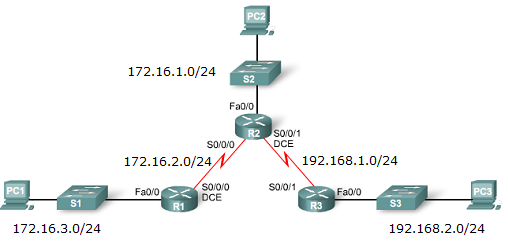
Adresseringstabell
Innan nätverksenheterna konfigureras är det viktigt att planera adresseringen. En adresseringstabell ger en samlad bild av vilka IP-adresser som ska användas på varje interface.
| Enhet | Interface | IPv4-adress | Nätmask | Default Gateway |
|---|---|---|---|---|
| PC1 | NIC | 172.16.3.10 | 255.255.255.0 | 172.16.3.1 |
| R1 | Fa0/0 | 172.16.3.1 | 255.255.255.0 | – |
| R1 | s0/0/0 | 172.16.2.1 | 255.255.255.0 | – |
| R2 | Fa0/0 | 172.16.1.1 | 255.255.255.0 | – |
| R2 | s0/0/0 | 172.16.2.2 | 255.255.255.0 | – |
| R2 | s0/0/1 | 192.168.1.2 | 255.255.255.0 | – |
| PC2 | NIC | 172.16.1.10 | 255.255.255.0 | 172.16.1.1 |
| R3 | Fa0/0 | 192.168.2.1 | 255.255.255.0 | – |
| R3 | s0/0/1 | 192.168.1.1 | 255.255.255.0 | – |
| PC3 | NIC | 192.168.2.10 | 255.255.255.0 | 192.168.2.1 |
Varje routerinterface måste ha en adress från det nätverk som interfacet är anslutet till. R1 och R2 får därför adresser från samma nätverk på länken mellan dem, medan R2 och R3 använder adresser från ett annat nätverk på sin gemensamma länk.
Förklaring av IOS kommando
- enable går från User EXEC till Privileged EXEC.
- configure terminal öppnar Global Configuration Mode.
- hostname ger enheten ett namn.
- no ip domain-lookup förhindrar att felskrivna kommandon försöker tolkas som DNS-namn.
- enable secret skyddar åtkomsten till privileged EXEC mode.
- username skapar ett lokalt användarkonto som exempelvis kan användas för inloggning via console eller SSH.
- login local säger åt IOS att använda den lokala användardatabasen för autentisering.
- service password-encryption gör att vissa lösenord inte visas direkt i klartext i konfigurationen.
- line console aktiverar lokal administration av enheten.
- line vty aktiverar fjärradministration av enheten.
- SSH (Secure Shell) används för säker fjärradministration av switchen. Kommunikationen krypteras mellan administratörens dator och nätverksenheten.
- Switchen arbetar huvudsakligen på lager 2 och behöver inte en IP-adress för att vidarebefordra vanliga Ethernet-ramar. Men för att switchen själv ska kunna administreras över IP-nätverket behöver den en management-IP.
- IP-adressen placeras därför på ett SVI (Switch Virtual Interface).
- ip default-gateway behövs när Layer 2-switchen själv ska kommunicera med en managementstation utanför sitt lokala IP-nätverk.
- banner motd (Message of the Day) visar ett meddelande när någon ansluter till enheten. Den används ofta för att informera om att åtkomsten är begränsad till behöriga användare.
Konfigurationer
- Switch> enable
- Switch# configure terminal
- Switch(config)# hostname S1
- S1(config)# no ip domain-lookup
- S1(config)# enable secret enP@55
- S1(config)# service password-encryption
- S1(config)# username admin1 secret admin1P@55
- S1(config)# username admin2 secret admin2P@55
- S1(config)# banner motd #Authorized Access Only!#
- S1(config)# line console 0
- S1(config-line)# login local
- S1(config-line)# exit
- S1(config)# ip domain-name diginto.se
- S1(config)# crypto key generate rsa general-keys modulus 1024
- S1(config)# ip ssh version 2
- S1(config)# line vty 0 4
- S1(config-line)# login local
- S1(config-line)# transport input ssh
- S1(config-line)# exit
- S1(config)# interface vlan 1
- S1(config-if)# description Management
- S1(config-if)# ip address 172.16.3.2 255.255.255.0
- S1(config-if)# no shutdown
- S1(config-if)# exit
- S1(config)# ip default-gateway 172.16.3.1
- S1(config)# end
- S1# show running-config
- S1# show ip interface brief
- S1# show ip ssh
- Router> enable
- Router# configure terminal
- Router(config)# hostname R1
- R1(config)# no ip domain-lookup
- R1(config)# enable secret enP@55
- R1(config)# service password-encryption
- R1(config)# username admin1 secret admin1P@55
- R1(config)# username admin2 secret admin2P@55
- R1(config)# banner motd #Authorized Access Only!#
- R1(config)# line console 0
- R1(config-line)# login local
- R1(config-line)# exit
- R1(config)# ip domain-name diginto.se
- R1(config)# crypto key generate rsa general-keys modulus 1024
- R1(config)# ip ssh version 2
- R1(config)# line vty 0 4
- R1(config-line)# login local
- R1(config-line)# transport input ssh
- R1(config-line)# exit
- R1(config)# interface fa0/0
- R1(config-if)# description LAN 1
- R1(config-if)# ip address 172.16.3.1 255.255.255.0
- R1(config-if)# no shutdown
- R1(config-if)# exit
- R1(config)# interface s0/0/0
- R1(config-if)# description DCE connected to R2
- R1(config-if)# clock rate 2000000
- R1(config-if)# ip address 172.16.2.1 255.255.255.0
- R1(config-if)# no shutdown
- R1(config)# end
- R1# show running-config
- R1# show ip interface brief
- R1# show ip route
- Switch> enable
- Switch# configure terminal
- Switch(config)# hostname S2
- S2(config)# no ip domain-lookup
- S2(config)# enable secret enP@55
- S2(config)# service password-encryption
- S2(config)# username admin1 secret admin1P@55
- S2(config)# username admin2 secret admin2P@55
- S2(config)# banner motd #Authorized Access Only!#
- S2(config)# line console 0
- S2(config-line)# login local
- S2(config-line)# exit
- S2(config)# ip domain-name diginto.se
- S2(config)# crypto key generate rsa general-keys modulus 1024
- S2(config)# ip ssh version 2
- S2(config)# line vty 0 4
- S2(config-line)# login local
- S2(config-line)# transport input ssh
- S2(config-line)# exit
- S2(config)# interface vlan 1
- S2(config-if)# description Management
- S2(config-if)# ip address 172.16.1.3 255.255.255.0
- S2(config-if)# no shutdown
- S2(config-if)# exit
- S2(config)# ip default-gateway 172.16.1.1
- S2(config)# end
- S2# show running-config
- S2# show ip interface brief
- S2# show ip ssh
- Router> enable
- Router# configure terminal
- Router(config)# hostname R2
- R2(config)# no ip domain-lookup
- R2(config)# enable secret enP@55
- R2(config)# service password-encryption
- R2(config)# username admin1 secret admin1P@55
- R2(config)# username admin2 secret admin2P@55
- R2(config)# banner motd #Authorized Access Only!#
- R2(config)# line console 0
- R2(config-line)# login local
- R2(config-line)# exit
- R2(config)# ip domain-name diginto.se
- R2(config)# crypto key generate rsa general-keys modulus 1024
- R2(config)# ip ssh version 2
- R2(config)# line vty 0 4
- R2(config-line)# login local
- R2(config-line)# transport input ssh
- R2(config-line)# exit
- R2(config)# interface fa0/0
- R2(config-if)# description LAN2
- R2(config-if)# ip address 172.16.1.1 255.255.255.0
- R2(config-if)# no shutdown
- R2(config-if)# exit
- R2(config)# interface s0/0/0
- R2(config-if)# description Connected to R1
- R2(config-if)# ip address 172.16.2.2 255.255.255.0
- R2(config-if)# no shutdown
- R2(config-if)# exit
- R2(config)# interface s0/0/1
- R2(config-if)# description DCE connected to R3
- R2(config-if)# clock rate 2000000
- R2(config-if)# ip address 192.168.1.2 255.255.255.0
- R2(config-if)# no shutdown
- R2(config-if)# exit
- R2(config)# end
- R2# show running-config
- R2# show ip interface brief
- R2# show ip route
- Switch> enable
- Switch# configure terminal
- Switch(config)# hostname S3
- S3(config)# no ip domain-lookup
- S3(config)# enable secret enP@55
- S3(config)# service password-encryption
- S3(config)# username admin1 secret admin1P@55
- S3(config)# username admin2 secret admin2P@55
- S3(config)# banner motd #Authorized Access Only!#
- S3(config)# line console 0
- S3(config-line)# login local
- S3(config-line)# exit
- S3(config)# ip domain-name diginto.se
- S3(config)# crypto key generate rsa general-keys modulus 1024
- S3(config)# ip ssh version 2
- S3(config)# line vty 0 4
- S3(config-line)# login local
- S3(config-line)# transport input ssh
- S3(config-line)# exit
- S3(config)# interface vlan 1
- S3(config-if)# description Management
- S3(config-if)# ip address 192.168.2.3 255.255.255.0
- S3(config-if)# no shutdown
- S3(config-if)# exit
- S3(config)# ip default-gateway 192.168.2.1
- S3(config)# end
- S3# show running-config
- S3# show ip interface brief
- S3# show ip ssh
- Router> enable
- Router# configure terminal
- Router(config)# hostname R3
- R3(config)# no ip domain-lookup
- R3(config)# enable secret enP@55
- R3(config)# service password-encryption
- R3(config)# username admin1 secret admin1P@55
- R3(config)# username admin2 secret admin2P@55
- R3(config)# banner motd #Authorized Access Only!#
- R3(config)# line console 0
- R3(config-line)# login local
- R3(config-line)# exit
- R3(config)# ip domain-name diginto.se
- R3(config)# crypto key generate rsa general-keys modulus 1024
- R3(config)# ip ssh version 2
- R3(config)# line vty 0 4
- R3(config-line)# login local
- R3(config-line)# transport input ssh
- R3(config-line)# exit
- R3(config)# interface fa0/0
- R3(config-if)# description LAN3
- R3(config-if)# ip address 192.168.2.1 255.255.255.0
- R3(config-if)# no shutdown
- R3(config-if)# exit
- R3(config)# interface s0/0/1
- R3(config-if)# description Connected to R2
- R3(config-if)# ip address 192.168.1.1 255.255.255.0
- R3(config-if)# no shutdown
- R3(config)# end
- R3# show running-config
- R3# show ip interface brief
- R3# show ip route